How to skip an approver on small requests?
"Is there a way to make signatures a choice?"- Google Docs Editors Community
Should a $40 check request wait for the CEO? In a Google Forms approval that goes through a manager and a CEO, small requests don't need the CEO's signature but large ones do. Google Forms has no signature question, let alone an optional one, and when every signature is required, the small request waits in the same line as a $4,000 one. Formesign lets you mark the CEO as optional on one form. The person filling in the request leaves the CEO's email empty when it isn't needed and the request completes once the manager signs.
Let's start. Create your form and follow the steps below.
1. Open the signer list
- Click on Create your form, click Enter your form name, type Check request and click Generate.
- Check the outline and click Proceed.
- You land on the EDIT tab, where the Add eSignature dialog says Your signing link is ready. Close it.
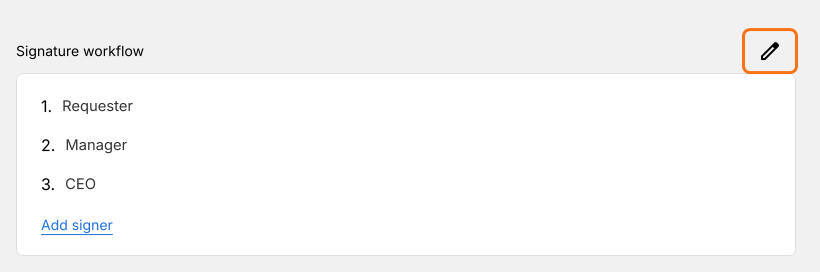
- Click the pencil on the Signature workflow card.
- The AI picks the signers from your form's name, so in Setup workflow, type over them so that they read Requester, Manager and CEO, delete any others from their three dots and click Next.
- Close the Your signing link is ready dialog.
- Click the pencil again.
2. Make the CEO optional
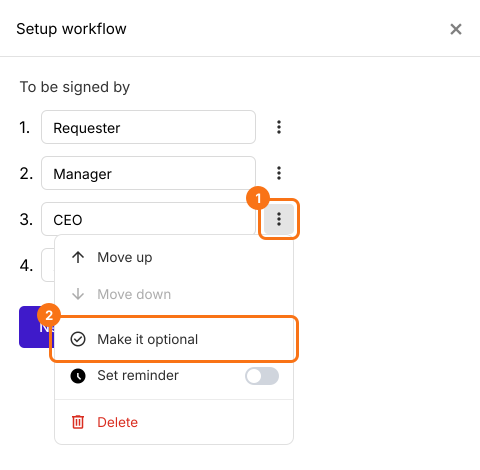
Click the three dots beside CEO and choose Make it optional. An Optional badge shows beside CEO. Click Next to save it and close the Your signing link is ready dialog.
3. Share the link
Click SHARE, click Copy and send the link to your staff.
4. Leave the CEO's email empty on small checks
After signing, the requester sees Enter approver emails. They decide by the amount: leave CEO email empty for a $40 check or fill it in for $4,000.

5. The check request finishes without the CEO
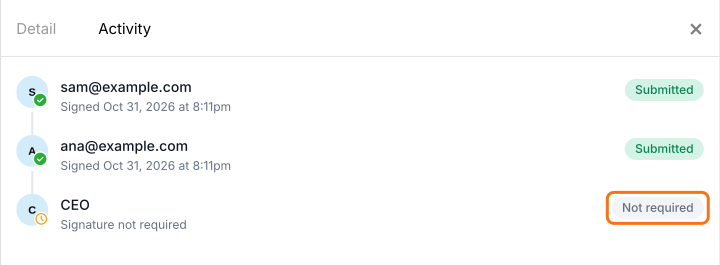
The CEO gets no email. In Activity, they show as Signature not required and the card says Signed and completed once the manager signs.
Summary
When some requests need an extra approver and others don't, making every signature required slows the small ones down. With Formesign, you make that signer optional on the same form. Whoever fills in the request leaves their email empty when it isn't needed and the request completes without them. Create your form and complete the steps above.
Last updated: