How to set up multiple payment methods for your business
"I am trying to get Apple Pay to be available as a payment method"- Google Sites Community
One payment link gives every customer one way to pay, whether or not they use it, and a Google Form can't take payment at all. On a phone, typing a card number is where people give up, while a wallet they already have takes a tap. With Neartail, your Google Form can offer several methods at once: cards through Stripe, Apple Pay and PayPal, and depending on your currency Venmo, Cash App, Zelle or UPI, as well as cash on delivery and bank transfer. Each customer picks one when they submit.
To set them up, create your order form and follow the steps below.
How to add multiple payment methods?
- On the page that opens, click Enter your form name, type your form's name and click Generate.
- Check the outline it suggests and click Proceed. Your form opens on the Edit tab.

Your form comes with products, an Order Amount question that adds up by itself and an Order Quantity question.
- Click on the ⚙️ icon in the last After page row above the Submit button
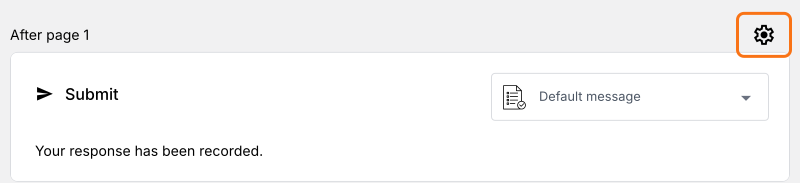
- The payment methods depend on the Currency here: Venmo, Cash App and Zelle are there with USD and UPI payments with INR. If you need another currency, change it and click on Save, then click on the ⚙️ icon again
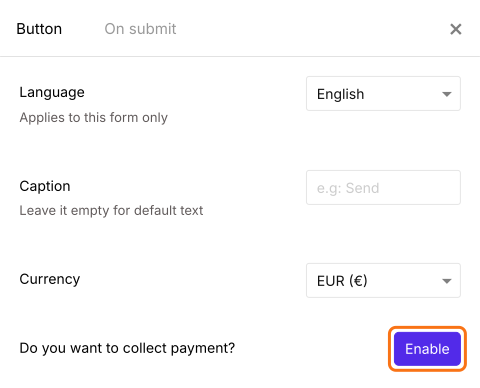
- Click on the Enable button next to Do you want to collect payment
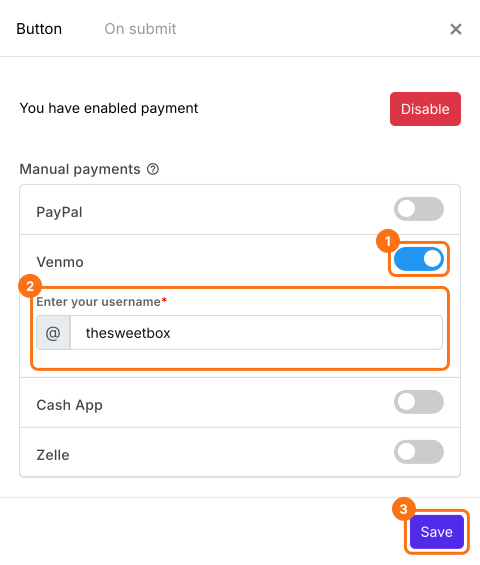
- To take a wallet payment manually, click on the toggle button next to Venmo or Cash App under Manual payments and enter your username or Cashtag. If your currency is INR, you will find UPI payments here and it asks for your UPI/VPA id and your name
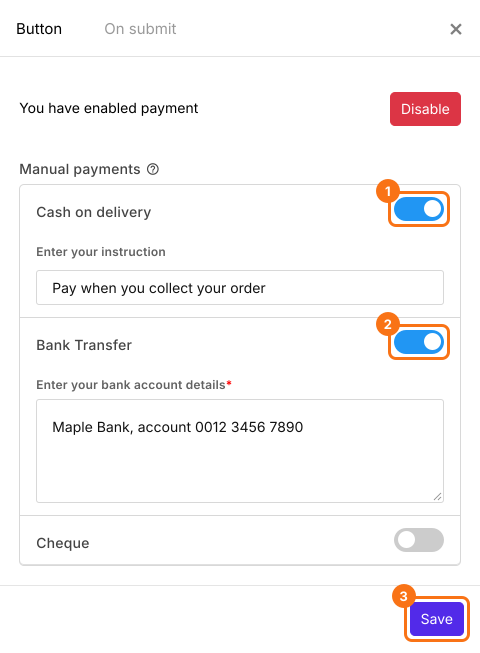
- To take cash or a bank transfer, click on the toggle button next to Cash on delivery or Bank Transfer, enter your instructions and click on Save
- To enable card payments, click on Configure next to Credit or Debit Cards to connect Stripe, as in How to accept online payments directly through your order form? Then click on the toggle button next to it and click on Save
If your form has a Delivery Fee, Tax or Discount, click on Add price field and add a Net Amount too. It shows in the Get net amount from list by itself and your customers pay it.
How to let users pay with their phone wallet?
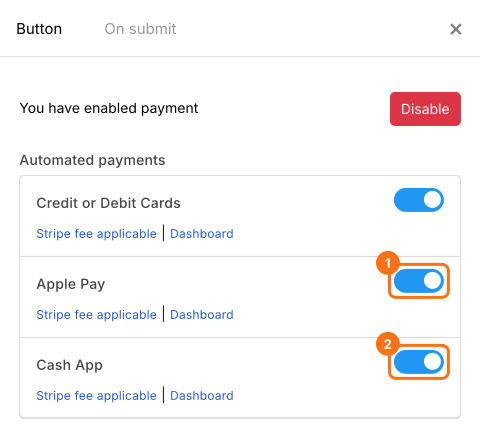
- Apple Pay works through Stripe, so connect Stripe first as above. In the Payments settings screen, click on the toggle button next to Apple Pay. If your currency is USD, you will find Cash App and Venmo here
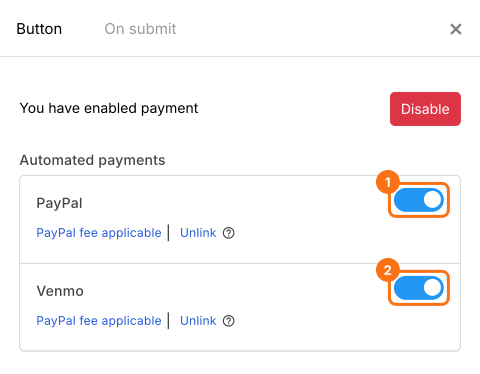
- Click on Configure next to PayPal to link your account and click on the toggle button. You can enable Venmo here if you have a PayPal business account
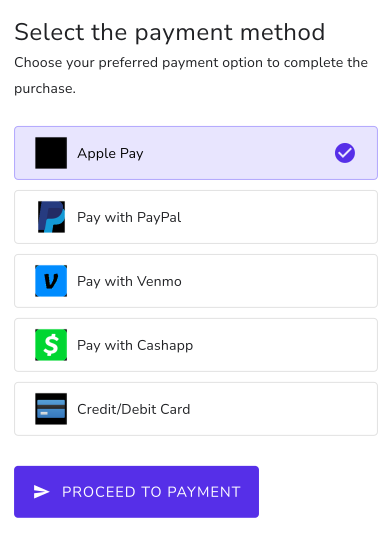
When users submit the form, they can select their payment method and click on Proceed to payment. If you have only one method on, they go straight to its payment page. With only Cash on delivery on, they click on Place order.
Summary
A Google Form takes no payment, and one link gives customers one way to pay. With Neartail, you turn on cards, wallets, bank transfer or cash on the same form, and each customer chooses how to pay when they submit. Create your order form and complete the steps above. If you have any questions, write to support.
Last updated: